
---
title: Hurco Mill Intro Training Class
description: This training class covers conversational programming for 3 axis machines and basic operation of the control. Students are guided through a course of programming parts from basic to more complex.
---

# Hurco Mill Training Course

This training class covers conversational programming for 3 axis machines and basic operation of the control. Students are guided through a course of programming parts from basic to more complex.

[ Mill Intro Training Course Workbook ](https://offer.hurco.com/hubfs/Hurco%20Mill%20Intro%20Course%20Workbook.pdf?hsLang=en-us)

![MAX4-vs-MAX5](https://offer.hurco.com/hubfs/MAX4-vs-MAX5.png "MAX4-vs-MAX5")

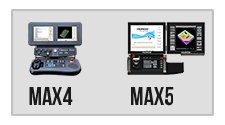
### **Please Note:** This course is designed for the MAX5 control. If you have a MAX4 Control (see picture at left on desktop and below on mobile) go to the original Mill Training Intro series located [here](https://www.hurco.com/en-us/support/pages/Training-Videos.aspx?cat=MAX%204%20WinMax%20V9%20Videos).

## WinMax Introduction

In this video we cover the buttons on the control panel, the icon bar for the desktop software, and introduce you to the most commonly used screens.

[ Downloadable PDF ](https://offer.hurco.com/hubfs/The%20Seven%20Main%20Screens.pdf?hsLang=en-us)

## Tool Setup

In this video we explain how to describe the tools that you will be using in your program, and how to apply speeds and feeds data, turning on coolant, etc...

## Graphics & Settings

This video will teach you how to use all the settings and the different controls in Max5 UI graphics.

## Create A New Program & Stock Geometry

In this video we will show you how to create new conversational programs, and how to designate stock geometry for use in graphics.

## Intro 1: Mill Circle

[ Part Print ](https://offer.hurco.com/hubfs/INTRO-1.pdf?hsLang=en-us)

## Intro 2: Mill Circle

[ Part Print ](https://offer.hurco.com/hubfs/INTRO-2.pdf?hsLang=en-us)

## Intro 3: Mill Frame

[ Part Print ](https://offer.hurco.com/hubfs/INTRO-3.pdf?hsLang=en-us)

## Intro 4: Mill Frame & Mill Face

[ Part Print ](https://offer.hurco.com/hubfs/INTRO-4.pdf?hsLang=en-us)

## Intro 5: Multi-Feature Part With Ellipse

[ Part Print ](https://offer.hurco.com/hubfs/INTRO-5.pdf?hsLang=en-us)

## Intro 7: Holes

Note: Intro 6 is in your print packet. Intro 6 is an optional print for you to do on your own.

[ Part Print ](https://offer.hurco.com/hubfs/INTRO-7.pdf?hsLang=en-us)

## Intro 8: Holes

[ Part Print ](https://offer.hurco.com/hubfs/INTRO-8.pdf?hsLang=en-us)

## Intro 9: Bolt Circle

[ Part Print ](https://offer.hurco.com/hubfs/INTRO-9.pdf?hsLang=en-us)

## Intro 10: Bolt Circle

[ Part Print ](https://offer.hurco.com/hubfs/INTRO-10.pdf?hsLang=en-us)

## Intro 11: Holes Skip List

[ Part Print ](https://offer.hurco.com/hubfs/intro%2011.pdf?hsLang=en-us)

## Exercise 1: Guide Plate

In this exercise we will be programming many of the features we have covered up to this point, all brought together in one part print. Please program this part on your own and then review the video below.

[ Part Print ](https://offer.hurco.com/hubfs/INTRO-12.pdf?hsLang=en-us)

![DO ON YOUR OWN](https://offer.hurco.com/hubfs/DO%20ON%20YOUR%20OWN.jpg "DO ON YOUR OWN")

## Review: Guide Plate Exercise 1

[ Part Print ](https://offer.hurco.com/hubfs/INTRO-12.pdf?hsLang=en-us)

## Intro 13 & 14: Patterns

[ Part Print ](https://offer.hurco.com/hubfs/INTRO-13.pdf?hsLang=en-us)

[ Part Print ](https://offer.hurco.com/hubfs/INTRO-14.pdf?hsLang=en-us)

## Intro 16: Lines & Arcs

Note: Intro 15 is in your print packet. Intro 15 is an optional print for you to do on your own.

[ Part Print ](https://offer.hurco.com/hubfs/INTRO-16.pdf?hsLang=en-us)

## Intro 18 & 19: Lines & Arcs

Note: Intro 17 is in your print packet. Intro 17 is an optional print for you to do on your own.

[ Part Print ](https://offer.hurco.com/hubfs/INTRO-18.pdf?hsLang=en-us)

[ Part Print ](https://offer.hurco.com/hubfs/INTRO-19.pdf?hsLang=en-us)

## Intro 20: Pocket Island

[ Part Print ](https://offer.hurco.com/hubfs/INTRO-20.pdf?hsLang=en-us)

## Intro 21: Lines & Arcs

[ Part Print ](https://offer.hurco.com/hubfs/INTRO-21.pdf?hsLang=en-us)

## Intro 27 & 28: Patterns

In this video we will be discussing the ability to "nest" patterns. One pattern block to create the grid pattern of holes, and a second to pattern duplicate those features in the necessary locations.

Note: Intro 22-26 is in your print packet. Intro 22-26 are optional prints for you to do on your own.

[ Part Print ](https://offer.hurco.com/hubfs/INTRO-27.pdf?hsLang=en-us)

[ Part Print ](https://offer.hurco.com/hubfs/INTRO-28.pdf?hsLang=en-us)

## Exercise 2: Ram Plate

In this exercise we will be programming many of the features we have covered up to this point, all brought together in one part print. Please program this part on your own and then review the video below.

[ Part Print ](https://offer.hurco.com/hubfs/INTRO-30.pdf?hsLang=en-us)

![DO ON YOUR OWN](https://offer.hurco.com/hubfs/DO%20ON%20YOUR%20OWN.jpg "DO ON YOUR OWN")

## Review: Ram Plate Exercise 2

[ Part Print ](https://offer.hurco.com/hubfs/INTRO-30.pdf?hsLang=en-us)

## Slot Plate

In this video we introduce the slot block to create the required slots for this print.

[ Part Print ](https://offer.hurco.com/hubfs/slot%20plate.pdf?hsLang=en-us)

## Hex Nut

In this video we will introduce the polygon and thread mill blocks to complete the part print.

[ Part Print ](https://offer.hurco.com/hubfs/hex%20nut.pdf?hsLang=en-us)

## Program Parameters

This video will define the many parameters that can be used when programming conversationally on the Hurco control.

[ Downloadable PDF ](https://offer.hurco.com/hubfs/Parameters%20Doc.pdf?hsLang=en-us)

## CNC Machining Blog - Tips & Tricks for Machinists

Subscribe for weekly posts on high-speed and 5-axis machining, workholding, the latest control technologies, plus Hurco tips-and-tricks…just to name a few.

[ Visit the Blog ](https://blog.hurco.com/?hsLang=en-us)

### Subscribe Here!

![](https://secure.pass8heal.com/222100.png) <https://offer.hurco.com/hurco-mill-intro-training-class#top>